Professional talking-head video production is one of the most effective ways to communicate a message directly to an audience. Whether you are creating a corporate announcement, promotional video, social media content, thought-leadership piece, training video or LinkedIn post, a professionally produced talking-head video can help build trust, credibility and engagement.
A well-planned professional talking-head video production can be repurposed across multiple platforms while maintaining a consistent brand message.
By carefully planning the script, filming location, lighting, sound recording and post-production workflow, a single talking-head video can be adapted into multiple formats for YouTube, LinkedIn, Instagram, Facebook and other platforms.
What is a talking head video?
A talking-head video is a style of video production in which a presenter, expert, business owner, or interviewee speaks directly to camera or to an interviewer. Talking head videos are commonly used for corporate communications, website introductions, training videos, product launches, social media content, documentaries and promotional campaigns.
Professional talking-head video production focuses on clear communication, strong audio quality, effective lighting and natural presentation skills.
Video announcement case study
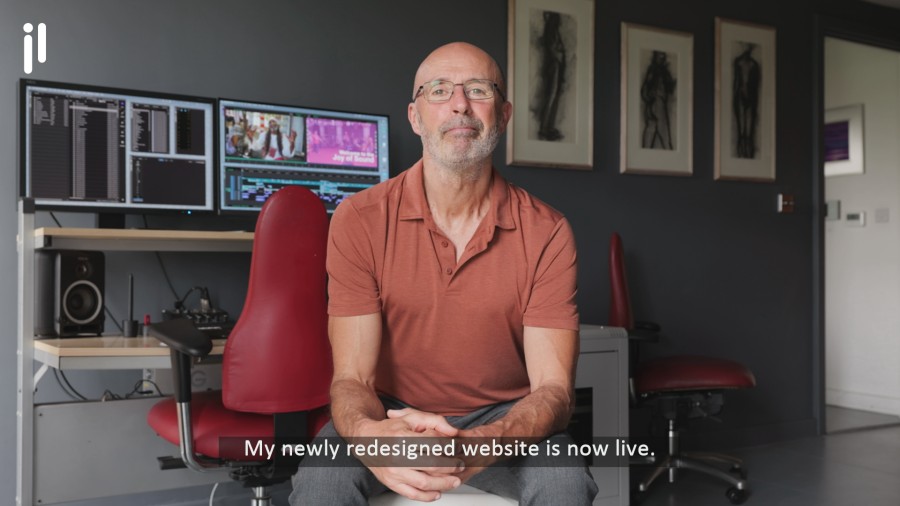
I recently created a talking-head production to communicate the news of my new website redesign. My aim was to share my exciting news across all of my online channels. I decided my deliverables would be a 16: 9 version for Google My Business, YouTube and Vimeo. A 9:16 version for Instagram and Facebook. A 1:1 version for LinkedIn. I’m using my talking-head video production as a case study to help share my thought processes during this production.
Planning the shoot
To start with, I thought about all of my aims for this production. I had many reasons for deciding to appear on camera to make this announcement. These included: To reintroduce myself to my connections to let them know I was still working and looking for opportunities. For potential new clients, I wanted to instil confidence and to update and reinforce ‘brand-me’. Filming myself also reinforces my learning. It also helps me understand how it feels, so I can better relate to the clients that I am filming.
Set design
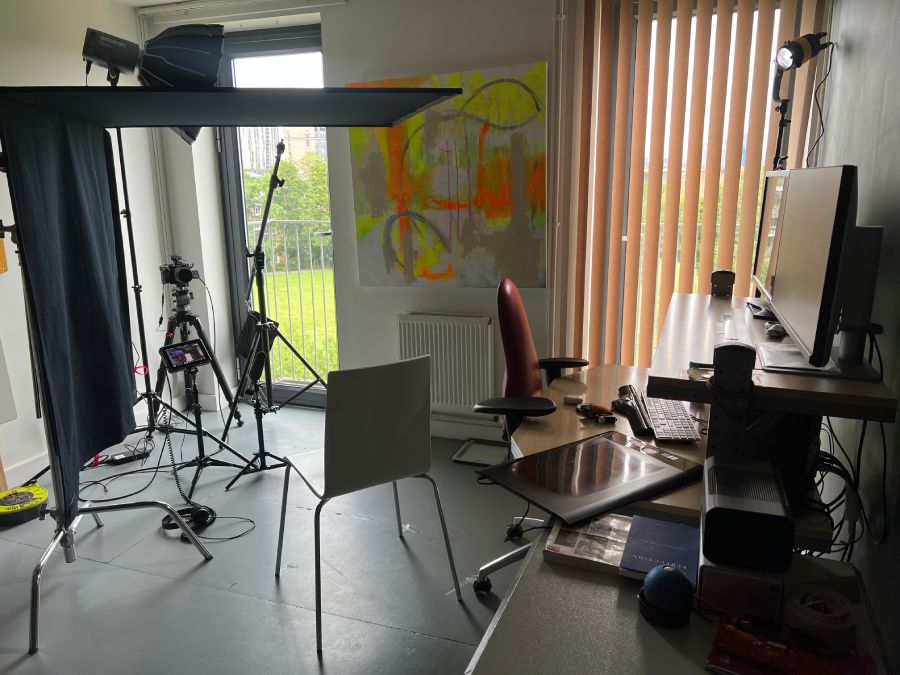
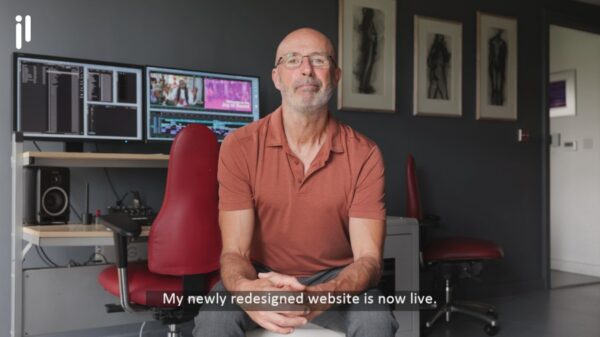
I knew I wanted to film myself in front of my video editing workstation set-up to show that I’m editing with a professional set-up. My editing workstation is set against a plain, dark grey-painted wall, which helps me colour grade my footage accurately. This darker colour background would work well for this production. My workstation also has two red leather ergonomic chairs, two monitors and a grey metal cabinet containing my RAID 5 drives. All of these help demonstrate my professional post-production set-up.
My camera framing was dictated by the size of the room, given the workstation’s position and the windows. My Tripod-mounted camera was set up in the adjacent corner. I made sure my workstation LCD monitors were showing the right visuals.
When considering your set location, consider the sound environment; ideally, you will want a quiet space or be able to record sound that can be clearly understood. Think about how the end result will look and what location might help reinforce your message.
Wardrobe and colour choices
What you wear and the colour choice really make a massive difference to the visual strength of a professional talking-head video production. The right colour combinations can really help visuals ‘pop’. On occasion I have bought a new top specifically for filming.
Looking through my wardrobe, I chose to wear a short-sleeved polo-style top in rust. This worked well with the grey walls and furniture and red chairs. It was a soft material that looked slightly metallic on camera. I chose to wear grey trousers that matched the wall colour and my office furniture.
Consider what cut and colours suit you and what you feel comfortable wearing in front of a camera.
Body positioning
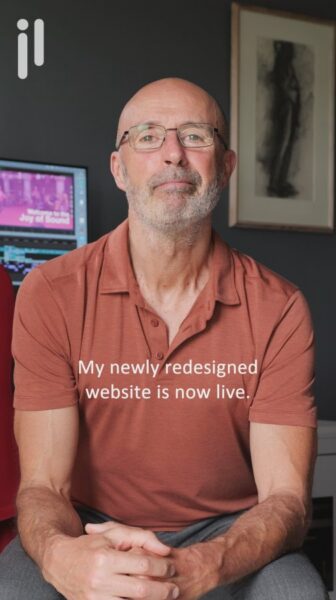
For this project, I filmed myself seated, leaning in slightly, looking directly at the camera, which I felt gave a sense of intimacy and, hopefully, a better connection with the audience. I gently held my hands together to emphasise a relaxed demeanour. I’ve previously filmed myself talking to camera sitting upright as well as standing. So far, I prefer this seated slightly leaned-in look.
Film some test shoots in different positions and watch them back to see which one you prefer.
Consider your body position when delivering different-framed deliverables. See the photographs below. Leave enough space above the head so that the visuals will work well on Instagram.
Lighting the set
My workstation is adjacent to two door-sized windows. With a grey, cloudy sky outside, these door windows served as big, soft lights. For one door window, I used its vertical blind to restrict the light across my workstation in the background. I also set up a spotlight to backlight my head and shoulders and a large negative-fill floppy on my shadow side to accentuate the shadows.
Ideally, you want control over the lighting environment to achieve a consistent look.
Sound recording
I used a directional Sennheiser boom mic fitted to a stand to record the sound. For the final take, I positioned the mic on a low floor stand, pointing directly at my mouth. I found this resulted in a better recording than with my Tram or Sanken COS-11 lavalier microphones.
It’s good to explore different microphone positions and microphones when possible. You could also consider adding sound-absorbing materials around the set to improve sound quality.
Script writing
I wanted a short script so I could memorise it and avoid using a teleprompter. A 20-30-second presentation seemed the optimal length for this project. By not reading the script, I knew I would deliver more naturally.
After a series of takes all filmed consecutively, I reviewed the footage and then made adjustments as I went to improve subsequent takes. This included adjustments to camera framing, body, head and hand movements, eye-to-camera engagement, and the delivery of tone and the speed of the read.
Practice your script, read it aloud to yourself. Explore slower and calmer reads. Watching different filmed versions back will help you hone your delivery.
Talking head filming
I’m not a natural talking-head video presenter, and it’s not something I particularly enjoy. So for me it’s quite a challenge. But I also want to make sure it looks and sounds good. What this means in practise is that I keep filming different versions of my piece to camera until I have a version I am happy with. I allow enough time to film this. I find I always improve over many takes. As with the previous suggestions, watching different takes back will help you refine your presentation.
I filmed this talking-head video production in UHD (3840 x 2160). This could have allowed me to add some key-framed movement in post-production when delivering for HD. I chose to keep a static frame to reinforce my messaging and avoid distraction.
Post-production
Once I had filmed a version I was happy with, I needed to edit it ready for delivery. This included adding subtitles, optimising sound quality and audio levels, adding my branding, and adjusting and cropping the framing for each deliverable. I also needed to make sure any text was in the safe text area, particularly for 9:16 delivery.
I edited three versions from the master footage: 16:9, 1:1, and 9:16, for different platforms.
Some people will watch with the sound down, so adding subtitles helps ensure your message is communicated. Subtitles also reinforce the spoken word and make video more accessible for those who can’t hear or are hard of hearing. For 9:16 Instagram videos, centred subtitled text works very well. For 16:9 and 1:1 formats, subtitles in the lower-third safe text area are standard. Different text positions might require subtitles to have an outline in a contrasting background colour to improve legibility.
Talking-head videos for different platforms
LinkedIn video production
LinkedIn is ideal for professional announcements, thought-leadership content and company updates. Talking-head videos often perform well because audiences respond positively to authentic communication.

Instagram Reel production
Vertical 9:16 talking-head videos can be highly effective for Instagram Reels, helping businesses connect with audiences through short-form content.
Facebook video production
Facebook supports both square and vertical formats, making it useful for community engagement and promotional campaigns.
YouTube talking-head videos
YouTube allows longer-form content and is ideal for educational videos, expert interviews and business storytelling.
Benefits of professional talking-head video production
Talking-head videos remain one of the most effective forms of video content because they allow viewers to connect directly with a person.
Benefits include:
- Building trust and credibility.
- Demonstrating expertise.
- Delivering complex information clearly.
- Creating authentic social media content.
- Supporting SEO and website engagement.
- Generating multiple versions for different platforms.
- Producing cost-effective video content compared with larger productions.
Video production summary
Things to consider when creating a talking head video production.
- Pre-production: Understanding project aims and writing a script or script outline. Who is the audience? Where will the video be shared? What are the deliverables?
- Art direction: Set aesthetics, filming location, set design, wardrobe and colour choices.
- On-camera presence and delivery & mechanics: Body positioning and tone of delivery
- Production filming: Ensuring professional recording with suitable lighting and high-quality audio recording.
- Post-production: Editing subtitles, branding and optimising the different framed deliverables.
Professional talking-head video production remains one of the most effective ways to communicate directly with an audience. By carefully planning the script, filming environment, lighting, audio recording and post-production workflow, a single shoot can generate content for multiple platforms while maintaining a consistent and professional appearance.
If you’re planning a professional talking-head video production and would like advice on filming, editing or delivery formats, please get in touch via my website contact form.
Frequently asked questions
What is professional talking-head video production?
Professional talking-head video production involves filming a presenter or interviewee using professional cameras, lighting, audio equipment and editing techniques to create engaging video content.
How long should a talking-head video be?
The ideal length depends on the platform. Social media videos are often between 30 seconds and 2 minutes, while YouTube and corporate videos may be significantly longer.
What is the difference between a talking-head video and a piece-to-camera video?
The terms are often used interchangeably. A piece-to-camera video generally refers to a presenter speaking directly to camera, while talking-head video is a broader production style that can include interviews and presentations.
Can one talking-head video be adapted for multiple platforms?
Yes. Professional productions are often framed and edited to create 16:9, 1:1 and 9:16 versions suitable for YouTube, LinkedIn, Facebook and Instagram.
Professional talking-head video production in London
As a BBC-trained filmmaker, videographer and editor based in London, I have more than 15 years of experience producing video content for businesses, organisations, agencies and individuals throughout London and the UK. My work includes corporate video production, interviews, event filming, promotional content and documentary-style productions.
You might enjoy reading some of my other related video production blog articles: