Corporate video editing is one of the specialist services I provide as a professional video editor. It is the process of assembling and refining filmed content for businesses, organisations and corporate communications. Editing often involves multiple rounds of client feedback, branded graphics, subtitles and the delivery of several versions for different platforms. Corporate video editing helps businesses communicate clearly, strengthen their brand identity and produce engaging content for employees, customers and stakeholders.
In this blog article, I provide a brief overview of corporate video editing across different genres.
-
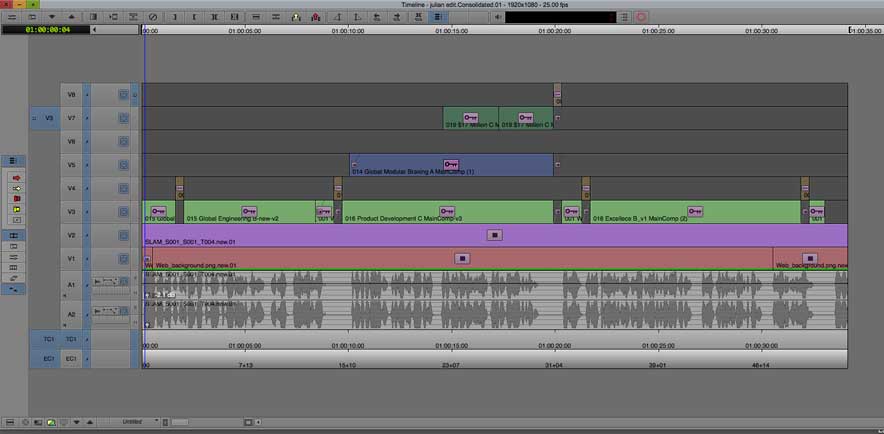
Part of a corporate video timeline showing Avid video effects b built up over seven layers
What types of corporate video editing are there?
Corporate video editing can cover a wide variety of topics and styles and be targeted towards different audiences. Corporate editing projects could include:
- internal communications
- promotional films
- recruitment videos
- training videos
- CEO announcements
- conference films
- product launches
Professional technical standards
Corporate clients require a wide range of professional skills for their video productions and post-production editing. In my experience, corporate productions are expected to meet extremely high technical standards. Because of this larger corporate productions often have sufficient budgets to employ a full filming crew with professional lighting and, where required, a dedicated sound recordist.
Studio filming and controlled environments
Corporate clients frequently use studio locations and specially designed virtual sets. Multiple cameras might be used for filming. Control of the lighting and environment can help to greatly increase the level of content quality. Many corporate offices have a large, suitable, quiet space that can be used for talking head filming. Filming interviews in front of a chroma key background allows clients to replace the background and maintain a consistent visual style.
B-roll and stock footage
Additional B roll footage can be filmed to illustrate key points in a presentation or corporate film. Larger corporate clients will commission specially shot footage from across their business-wide operation. This B-roll footage might be used in motion graphics or graphics animation. However, additional stock footage can be purchased to help with the editing. For example, this might include drone footage or archive shots.
Motion graphics in corporate video editing
Some of the corporate projects that I have edited have included animations and complex multi-layered motion graphics. Specialist motion graphics designers often supply these graphics after the client has approved them. These include infographics that convey a lot of information in an engaging way. An animating version of the logo might also be available for the edit.
These digital files may be delivered with an embedded alpha channel to enable quality keying over live-action or interview footage.
Colour Grading
Colour grading is an important stage of corporate video editing. It helps ensure footage from multiple cameras appears consistent while reinforcing the client’s brand style. Careful colour correction also improves skin tones, contrast and overall production quality.
Audio Post Production
Corporate video editing also includes improving dialogue clarity, balancing music and speech, reducing background noise and ensuring audio meets appropriate loudness standards for the intended platform.
Additional text elements and branding
Corporate videos may be required to present facts and figures, using additional text to support the talking head or content dialogue. These simple texts can be created in the edit with some movement added if required.
Most brands have a set of brand guidelines that they can supply for the edit. Brand guidelines detail things like the specific colours to use, as well as positioning guidance for the brand logo.
Editors add lower third captions to identify speakers and display their roles. Editors also create subtitles to improve accessibility and allow viewers to follow the video without sound.
Working with corporate communications teams and agencies
In my experience, corporate clients tend to have a communications team that works with external producers and agencies to deliver their creative content. It’s then the agencies or producers that will commission freelancers when required. You might be delivering content through various stages rather than directly to the actual client.
Client feedback and approval
Corporate clients often involve several stakeholders in the approval process. Therefore, this can mean many more detailed changes than would normally be considered for other clients (perhaps with less budget?). Furthermore, the actual client signing off on the project may be in a different country or time zone.
Fast File Transfers
To help manage the approval process efficiently, it is a good idea to have the fastest available internet speeds. Fast upload speed is essential. Because of this, I now use Hyperoptic for full-fibre broadband, which helps me deliver my edits to the client as fast as possible for feedback and eventual sign-off.
To share my edits with clients, I upload the edited file to my Vimeo channel, where I can set it to private and password-protected. As a result, I can then share a password-protected link with my client, ensuring any edits are kept private.
Similarly, to transfer files, I use MyAirBridge, which is a secure file transfer platform. It offers optional end-to-end encryption, password protection, and custom link expiration dates to keep your files safe.
Highly responsive attitude
Working as a video editor on corporate projects, I’ve realised that greater importance is attached to being highly responsive to the corporate client’s needs. It may be necessary to edit to overrun into the night and weekends. The expectation in the corporate world is that you will strive to excel and outperform, and this ethos translates into the creative projects they commission.
Technical deliverables
Versioning
Furthermore, many corporate projects require additional versions for different platforms. For example, a full-length interview may need a short highlights version edited. A social-first version may also be required suitable for landscape 16:9, vertical 9:16 and square 1:1 formats. A teaser or trailer edit might also be required.
Therefore, each of these different edits will require some additional editing. For example, some landscape 16:9 shots will not work well in a vertical 9:16 video.
As mentioned, the texts and subtitles on different versions will need to be adjusted to fit different aspect ratios.
Data Management for corporate video editing
As with any post-production process, it’s vital to protect the security of all the project data. This includes the media and all project files. Therefore, a good workflow is to always back up your media onto a separate drive once it’s been transferred to your main storage system. In addition to having a backup of all media assets, ensure your editing software project information is also constantly backed up onto a separate drive. Consequently, I have an SSD plugged into my Mac that constantly backs up my Avid project files.
As a result, I keep all of my media on local drives and a separate copy on backup drives, which helps keep everything well protected and secure.
Ask clients whether they would like copies of the final media for long-term archiving.
Frequently asked questions
What is corporate video editing?
Corporate video editing is the process of assembling and refining filmed content for businesses, organisations and corporate communications.
How long does corporate video editing take?
This depends on many factors, including how much footage is supplied to the edit, how many people are involved in the sign-off process and the duration and quantity of the deliverables required.
What software is used for corporate video editing?
I use Avid Media Composer for editing, the industry standard for high-end, complex projects.
Can one corporate video be edited for multiple platforms?
Yes, once a video has been edited, additional edits can be made to ensure its suitability for any required platform.
Why is versioning important?
Versioning allows a single piece of content to be updated to suit different requirements. This allows for efficient branded communication across different channels.